1. Start Here
A built-in guide to setting up and using the workbook.
- Set-up steps: Settings, Price List and Equipment & Servicing
- What to do for every new client, every morning and every week
- How the workbook works: blue headers for typing, grey headers calculated, the Check column
- Metric or Imperial, and how to start a new tax year
- Definitions of every figure: revenue earned, cash collected, net profit, pounds per man-hour, suggested price, round pounds per crew-hour
- Capacity of the workbook at a glance
2. Dashboard
Your business at a glance, updated from your records.
- Period filter: this tax year, this month, last 30 days, all time, each MTD quarter or each month of the tax year
- Client type filter: Residential, Commercial, Managing Agent / Estate, Landlord / Letting Agent, Council / School or Other
- Four cards: revenue earned, cash collected, net profit and pounds per man-hour
- Net profit card shows the tax set-aside so far for the tax year
- Revenue by service category: jobs, revenue, share and average per job
- Regular work as a share of revenue
- Needs attention: 8 counters, from work not invoiced to entries to fix
- Cash in vs. cash out chart by month of the tax year
- Rounds this week: stops, hours and pounds per crew-hour per day
- Who owes you and the next equipment servicing
3. Action Board
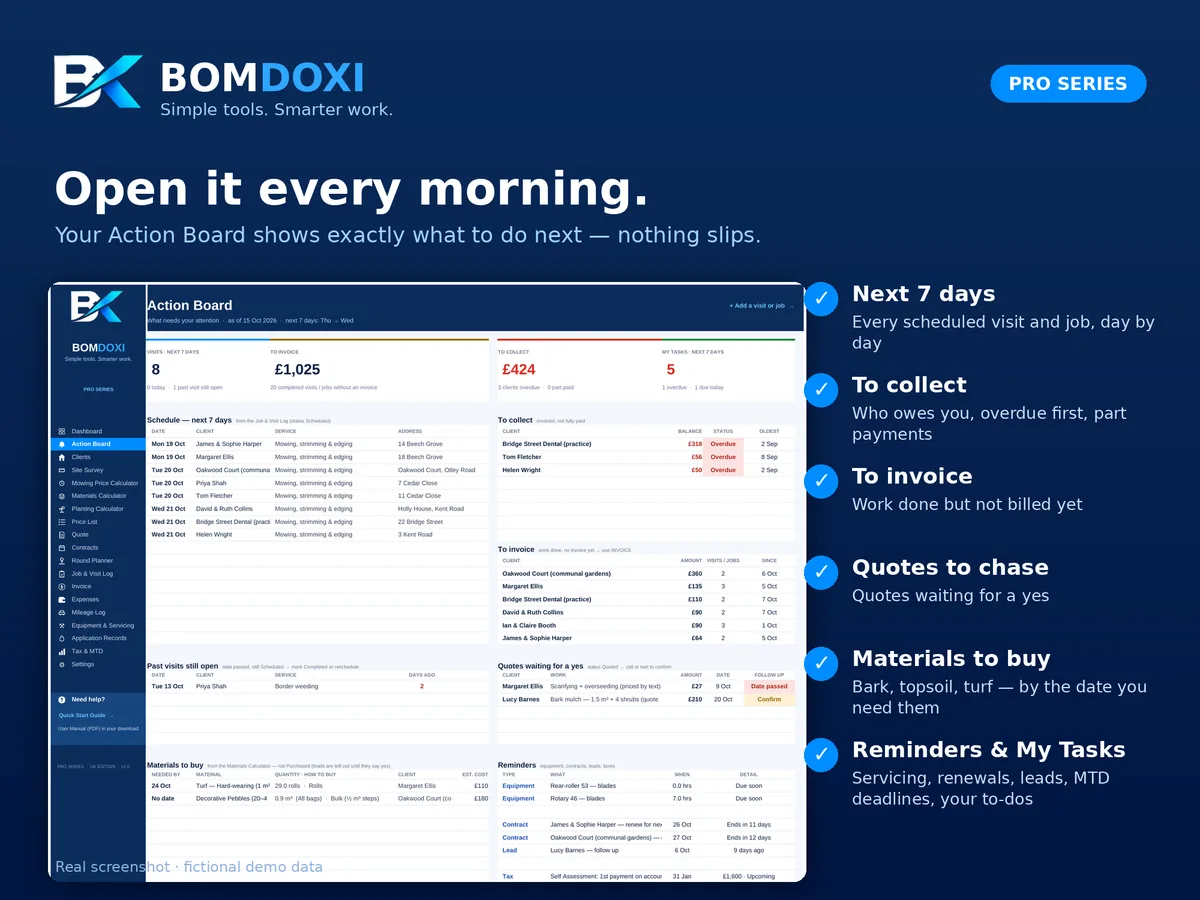
What needs your attention today and this week.
- Schedule for the next 7 days from the Job & Visit Log
- To collect: invoiced work not fully paid, overdue first, part payments included
- To invoice: completed visits and jobs with no invoice yet
- Past visits still open, with days ago
- Quotes waiting for a yes, with a follow-up flag when the date has passed
- Materials to buy by their Needed By date (leads are left out until they say yes)
- Reminders: servicing due, contracts ending, leads to follow up and the next tax deadline (MTD quarterly update or Self Assessment payment)
- Your own task list (25 rows) with due date, client and status: Overdue, Today, This week or Later
4. Clients & Properties
One row per client and address.
- Contact details, address, town, county and postcode, client type, status (Lead, Active, Paused or Lost) and lead source
- Lawn type, side-gate width, dogs or pets in the garden and access notes
- Mowing frequency (weekly, fortnightly, every 10 days, monthly or one-off), price per visit and round day
- Lawn, banks, border area, edging, hedges and trees, filled in from the Site Survey
- Widest mower that fits through the side gate
- Revenue for the tax year, unpaid work and last service, filled in automatically
5. Site Survey
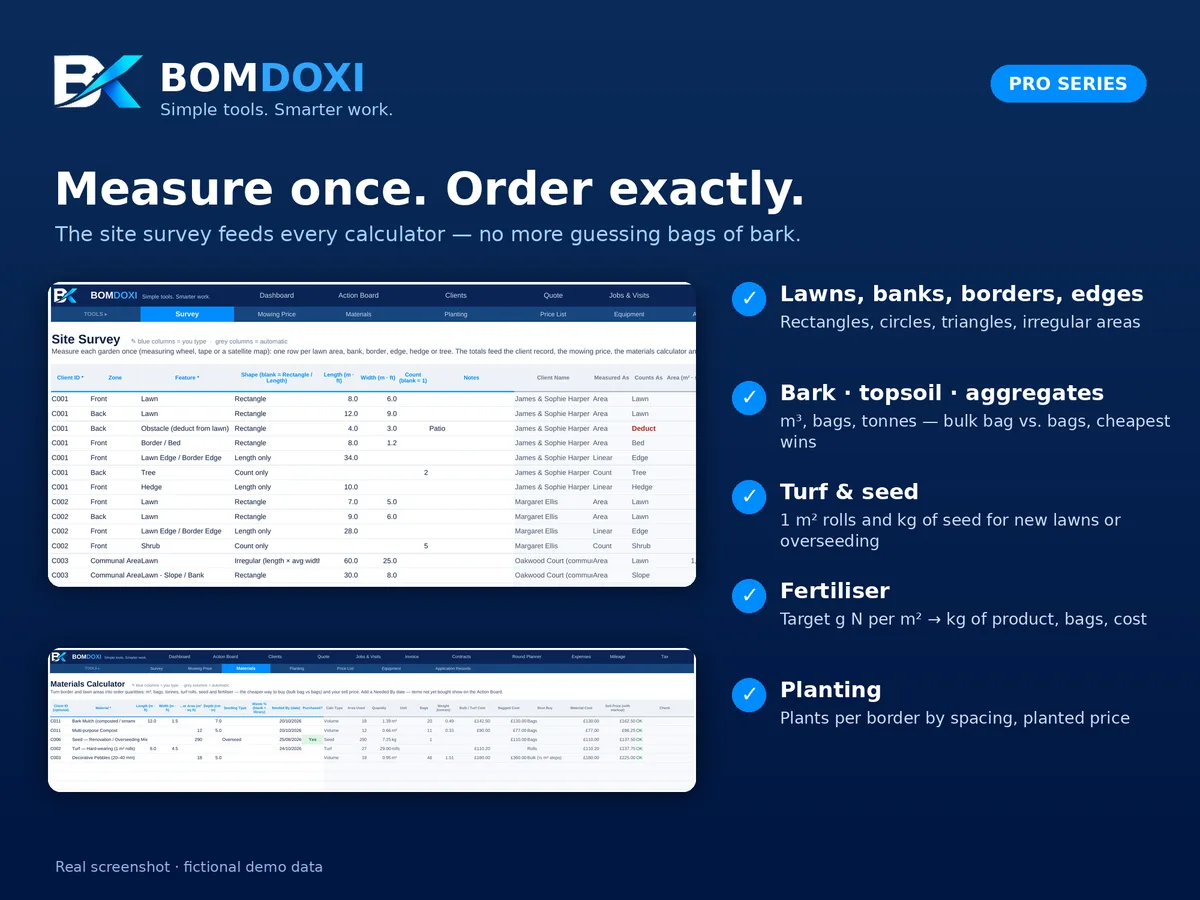
Measure each garden once, by measuring wheel, tape or satellite map.
- One row per zone and feature: lawn, bank, border, bark area or tree circle, gravel, patio or paving, obstacle, hedge, lawn or border edge, fence line, tree or shrub
- Shapes: rectangle, circle, triangle, irregular, length only or count only
- Areas, lengths and counts add up per client
- Obstacles are deducted from the lawn area
6. Mowing Price Calculator
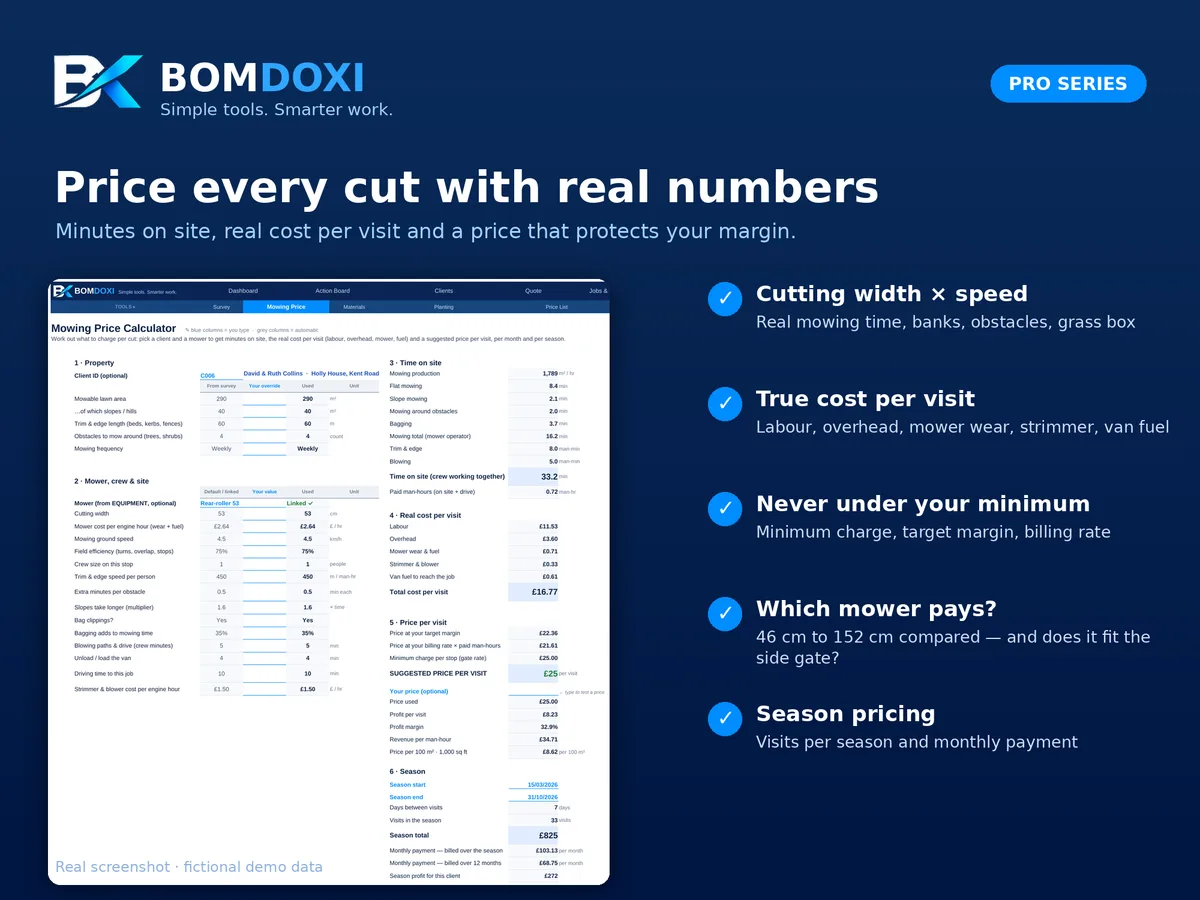
A suggested price per cut for any lawn.
- Pick a client (or type the areas) and a mower from your equipment
- Mowing, strimming, edging and blowing time, with banks, obstacles and grass-box emptying
- Mowing speed follows the mower: pedestrian or ride-on
- Time on site with your crew, paid man-hours and driving time
- Real cost per visit: labour, overhead, mower wear and fuel, strimmer and blower, van fuel
- Suggested price: the highest of target margin, billing rate and minimum charge per visit, rounded up
- Your own price (optional) with profit per visit, margin, revenue per man-hour and price per 100 m²
- Season cuts, season total, monthly payment and season profit
- "Which mower pays?": cost, price and side-gate fit for 46, 53, 76, 107, 122 and 152 cm mowers
7. Materials Calculator
Order quantities and prices from border and lawn areas.
- 40 lines: bark, topsoil, compost, top dressing, gravel, pebbles, sub-base, turf and seed
- Area from length and width, or typed directly, and depth
- Cubic metres, number of bags and weight in tonnes
- Bulk bag vs. bagged cost and the cheaper way to buy
- Turf rolls and seed for a new lawn or overseeding
- Material cost and sell price with your markup
- Needed By date and Purchased flag: open items show on the Action Board
- Fertiliser calculator (10 lines): kilos of product and bags per application from the bag's N % and your target nitrogen rate
8. Planting Calculator
How many plants a border needs, and the planted price.
- 40 lines: plant, category, pot size and border
- Plants needed from border area, spacing and square or triangular pattern
- Nursery cost, your markup and planting time by pot size, from plug trays and 9 cm pots to root-ball trees
- Plant price, planting labour price and total price
9. Price List
Your price list, pre-filled with 60 common UK garden and lawn care services.
- 13 categories, from grass cutting and lawn treatments to hedges, borders and bark, turfing, jet washing and green waste
- A five-step lawn treatment programme priced per 100 m², with a minimum treatment charge
- Units per visit, per 100 m², per m², per cubic metre, per hour, per metre, per day and more
- Price, material cost, production rate and VAT flag for each line
- Margin, revenue per man-hour and Pricing Health: On target, Below target or Losing money
- Up to 120 services; prices are examples to change for your area
10. Quote
A printable quote for any client.
- Client details and garden measurements from your survey
- Regular grass cutting: service, frequency, price per visit and season total
- Up to 15 one-off services and materials by service code
- Discount, VAT (once you are registered) and deposit
- Valid-until date, weather policy, terms, plant guarantee and a signature line
11. Maintenance Contracts
Your season contracts and what they are worth.
- Season start and end, mowing frequency and price per cut
- Lawn treatments, aeration and scarifying, overseeding, spring tidy-up, autumn leaf clearance, hedges and other work
- Discount and billing plan: monthly during the season, 12 equal payments, per visit or paid in full
- Contract value, number of payments and amount per payment
- Cuts per month, renewal date and days left
- Status: Upcoming, Active, Ending soon (30 days before) or Ended
12. Round Planner
Your weekly mowing rounds.
- Day, stop order and week A or B for fortnightly clients
- On-site and driving minutes per stop
- Pounds per crew-hour for each stop, including driving time
- Summary per day: stops, on-site hours, driving hours, driving %, average weekly revenue and pounds per crew-hour
- Rating per day: Strong, OK or Below cost
13. Job & Visit Log
Every cut and job, from quote to payment.
- Date, client, service code, quantity and optional override price
- Job type: recurring visit, treatment programme, one-off or installation
- Status: Quoted, Scheduled, Completed, Skipped (weather) or Cancelled
- Actual man-hours and crew
- Invoice number, paid date, amount paid (for part payments) and payment method
- Amount, revenue per man-hour, payment status (Unbilled, Invoiced, Part paid, Overdue or Paid) and balance due
- Price per visit from the client record for regular grass cutting
- Up to 1,500 lines
14. Invoice
A printable invoice for any client and period.
- Lists the client's completed visits and jobs automatically (up to 25 lines)
- 5 extra lines you type yourself
- VAT once you are registered, payments received and balance due
- Due date from your payment terms and your payment instructions
- Shows the next free invoice number and warns if a number is already used
15. Expenses
Every business cost, recorded once.
- Date, category, description, supplier, amount, payment method and receipt kept
- 25 default categories, including fuel, equipment, fertiliser and lawn treatments, bark, soil and aggregates, green waste and tip fees, insurance, waste carrier registration and van costs
- Each category mapped to its SA103 category, editable in Settings
- Link fuel and repairs to a machine, and job materials to a client
- Up to 1,500 expenses
16. Mileage Log
Business driving with HMRC simplified mileage applied.
- Date, vehicle, purpose or round, odometer readings or miles, optional client
- Higher rate for the first 10,000 business miles of each tax year and lower rate above, from an editable rate table in Settings
- Amount per trip
- Up to 1,000 trips
17. Equipment & Servicing
Your machines and what they really cost.
- Ride-on, rear-roller and rotary mowers (with cutting width), strimmers, blowers, hedge trimmers, scarifiers, aerators, van and trailer
- Purchase price, salvage value and useful life: depreciation and book value
- Hour meter with oil, blade and air-filter intervals
- Next service and status: OK, Due soon (10 hours or less) or Overdue
- Fuel use in litres per hour and yearly repairs: real cost per engine hour, used by the Mowing Price Calculator
- Expenses for the tax year per machine
- Up to 60 machines
18. Application Records
A record of every pesticide and fertiliser application.
- Date, time, property, application type and product
- MAPP No., target, rate per 100 m², area treated and total product used
- Wind in mph, temperature in °C, operator and certificate number (PA1 / PA6)
- Advisory when wind is over 10 mph or the MAPP No. is missing
- Up to 500 records
Note: always follow the product label and the rules for professional pesticide use.
19. Tax & MTD
Your tax year from 6 April, month by month.
- Income collected, expenses paid, mileage and estimated net profit per tax month
- Suggested set-aside: income tax and Class 4 National Insurance on your projected profit, or a fixed percentage, with what you actually saved
- Tax rates 2026/27 in editable cells
- Vehicle method: simplified mileage rate or actual vehicle costs
- Making Tax Digital: the four standard quarters with update deadlines, income, profit, date sent and status
- Expenses by SA103 category for each quarter and the tax year
- Self Assessment: payments on account and balancing payment with due dates and status
- VAT registration check against the £90,000 threshold over the last 12 months
Note: a planning estimate, not tax advice. It does not send anything to HMRC. Ask your accountant.
20. Settings
Your business details and the pricing engine behind every calculator.
- Business name, contact details and a VAT number or insurance line
- Tax year and as-of date
- Metric or Imperial
- VAT rate and tax set-aside percentage
- Billing rate, labour cost and overhead per man-hour, target margin and minimum charge per visit
- Default crew size, fuel price per litre, van fuel economy in mpg, driving speed and price rounding
- Quote validity, payment terms, plant guarantee, material and plant markups, weather policy, quote terms and invoice footer
- Material Library: 21 materials pre-filled with density, bag size in litres, bulk and bag prices, seed rates in g per m² and turf rolls (up to 30)
- Editable lists: service categories, client types, lawn types, payment methods, expense categories and their SA103 categories, equipment types, application types, pot sizes, lead sources and HMRC mileage rates